> ## Documentation Index
> Fetch the complete documentation index at: https://docs.nomadicml.com/llms.txt
> Use this file to discover all available pages before exploring further.

# Quickstart

> This guide will help you get up and running with Nomadic quickly, either through our web platform or using the SDK. 

## Using the Web Platform

The fastest way to start using Nomadic is through our web platform at [app.nomadicml.com](https://app.nomadicml.com).

### 1. Create an Account

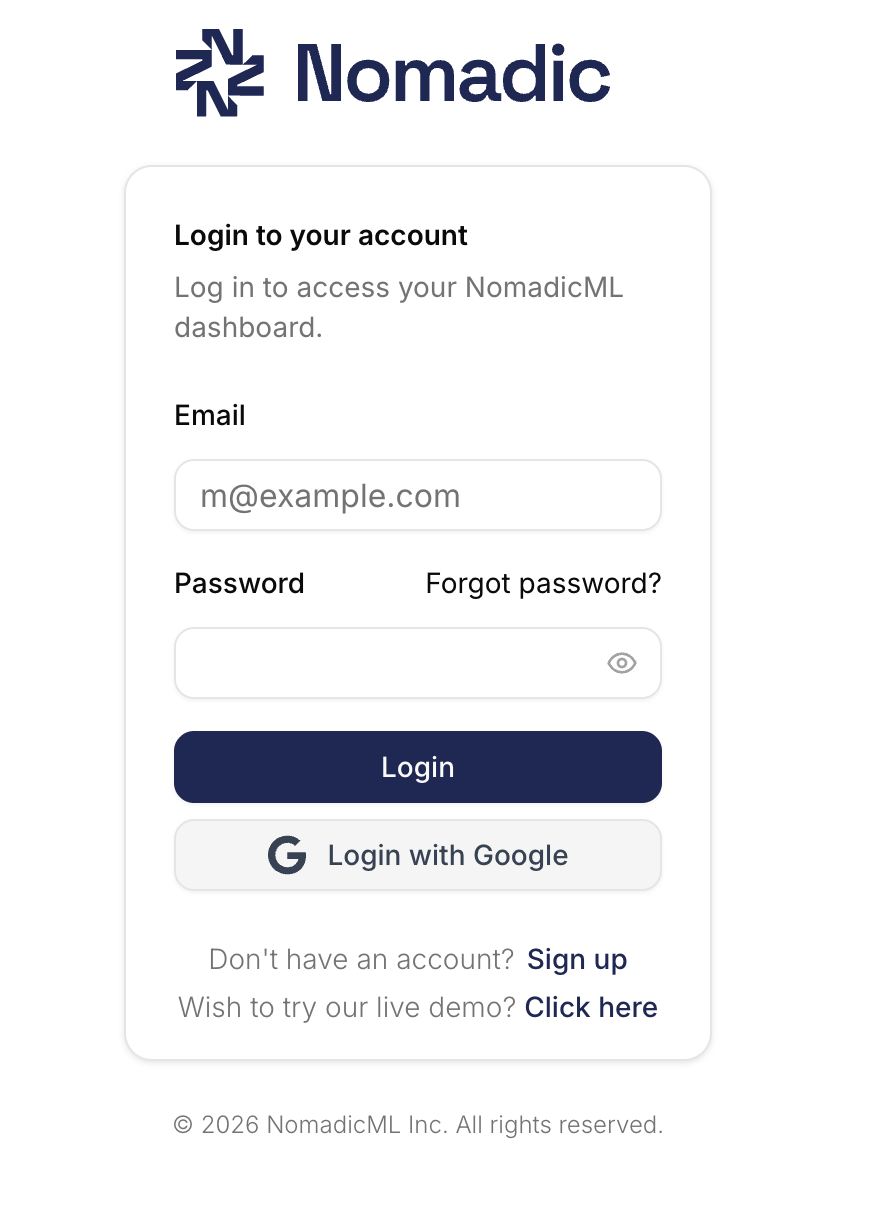
Sign up for a free account on [app.nomadicml.com/login](https://app.nomadicml.com/login).

<img src="https://mintlify.s3.us-west-1.amazonaws.com/nomadicmlinc/screenshots/SCR-Login%20SS.png" alt="Nomadic login screen" style={{ width: '80%' }} />

<p style={{ fontSize: '1.25rem', fontWeight: 600, marginTop: '1.5rem', marginBottom: '1rem', border: '1px solid #C7CAEC', borderRadius: '8px', padding: '12px 16px', backgroundColor: '#F5F6FB' }}>
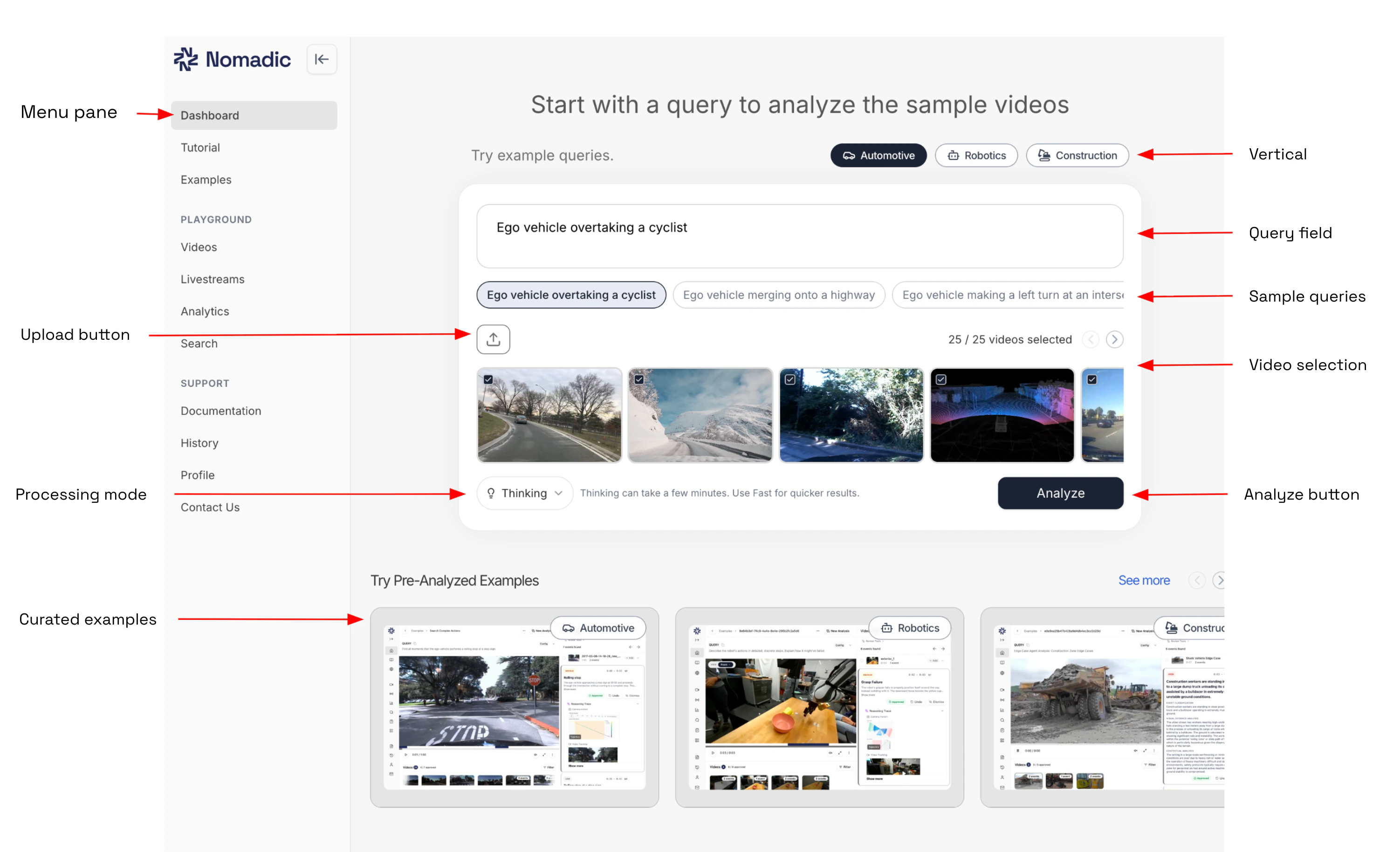
  Here you can test one of our sample queries, filter to different verticals, or upload your own videos.
</p>

<img src="https://mintcdn.com/nomadicmlinc/-FOX_0DwEjBpd1-m/screenshots/SCR-query%20page.png?fit=max&auto=format&n=-FOX_0DwEjBpd1-m&q=85&s=c216ef5fc172d3441de080a3b116755f" alt="Nomadic login screen" style={{ width: '120%' }} width="3004" height="1828" data-path="screenshots/SCR-query page.png" />

<table style={{ borderCollapse: 'collapse', width: '80%', margin: '0 auto' }}>
  <thead>
    <tr>
      <th style={{ border: '1px solid #d1d5db', padding: '8px', textAlign: 'left', backgroundColor: '#f3f4f6' }}>Feature</th>
      <th style={{ border: '1px solid #d1d5db', padding: '8px', textAlign: 'left', backgroundColor: '#f3f4f6' }}>Description</th>
    </tr>
  </thead>

  <tbody>
    <tr>
      <td style={{ border: '1px solid #d1d5db', padding: '8px' }}><strong>Menu pane</strong></td>
      <td style={{ border: '1px solid #d1d5db', padding: '8px' }}>Shows which part of the portal you are located in</td>
    </tr>

    <tr>
      <td style={{ border: '1px solid #d1d5db', padding: '8px' }}><strong>Upload button</strong></td>
      <td style={{ border: '1px solid #d1d5db', padding: '8px' }}>Upload your own videos here</td>
    </tr>

    <tr>
      <td style={{ border: '1px solid #d1d5db', padding: '8px' }}><strong>Processing Mode</strong></td>

      <td style={{ border: '1px solid #d1d5db', padding: '8px' }}>
        Thinking - for accurate results, can take a few mins

        <br />

        Fast - for quicker results, takes seconds
      </td>
    </tr>

    <tr>
      <td style={{ border: '1px solid #d1d5db', padding: '8px' }}><strong>Curated examples</strong></td>
      <td style={{ border: '1px solid #d1d5db', padding: '8px' }}>See already curated examples from sample videos</td>
    </tr>

    <tr>
      <td style={{ border: '1px solid #d1d5db', padding: '8px' }}><strong>Vertical</strong></td>
      <td style={{ border: '1px solid #d1d5db', padding: '8px' }}>Filter to specific application based on your query</td>
    </tr>

    <tr>
      <td style={{ border: '1px solid #d1d5db', padding: '8px' }}><strong>Query field</strong></td>
      <td style={{ border: '1px solid #d1d5db', padding: '8px' }}>Enter query for your analysis</td>
    </tr>

    <tr>
      <td style={{ border: '1px solid #d1d5db', padding: '8px' }}><strong>Sample query</strong></td>
      <td style={{ border: '1px solid #d1d5db', padding: '8px' }}>select from a sample query</td>
    </tr>

    <tr>
      <td style={{ border: '1px solid #d1d5db', padding: '8px' }}><strong>Video selection</strong></td>
      <td style={{ border: '1px solid #d1d5db', padding: '8px' }}>Select the videos to process for this analysis</td>
    </tr>

    <tr>
      <td style={{ border: '1px solid #d1d5db', padding: '8px' }}><strong>Analyze</strong></td>
      <td style={{ border: '1px solid #d1d5db', padding: '8px' }}>Click to perform analysis</td>
    </tr>
  </tbody>
</table>

<div style={{ fontSize: '1.25rem', fontWeight: 600, marginTop: '1.5rem', marginBottom: '1rem', border: '1px solid #C7CAEC', borderRadius: '8px', padding: '12px 16px', backgroundColor: '#F5F6FB' }}>
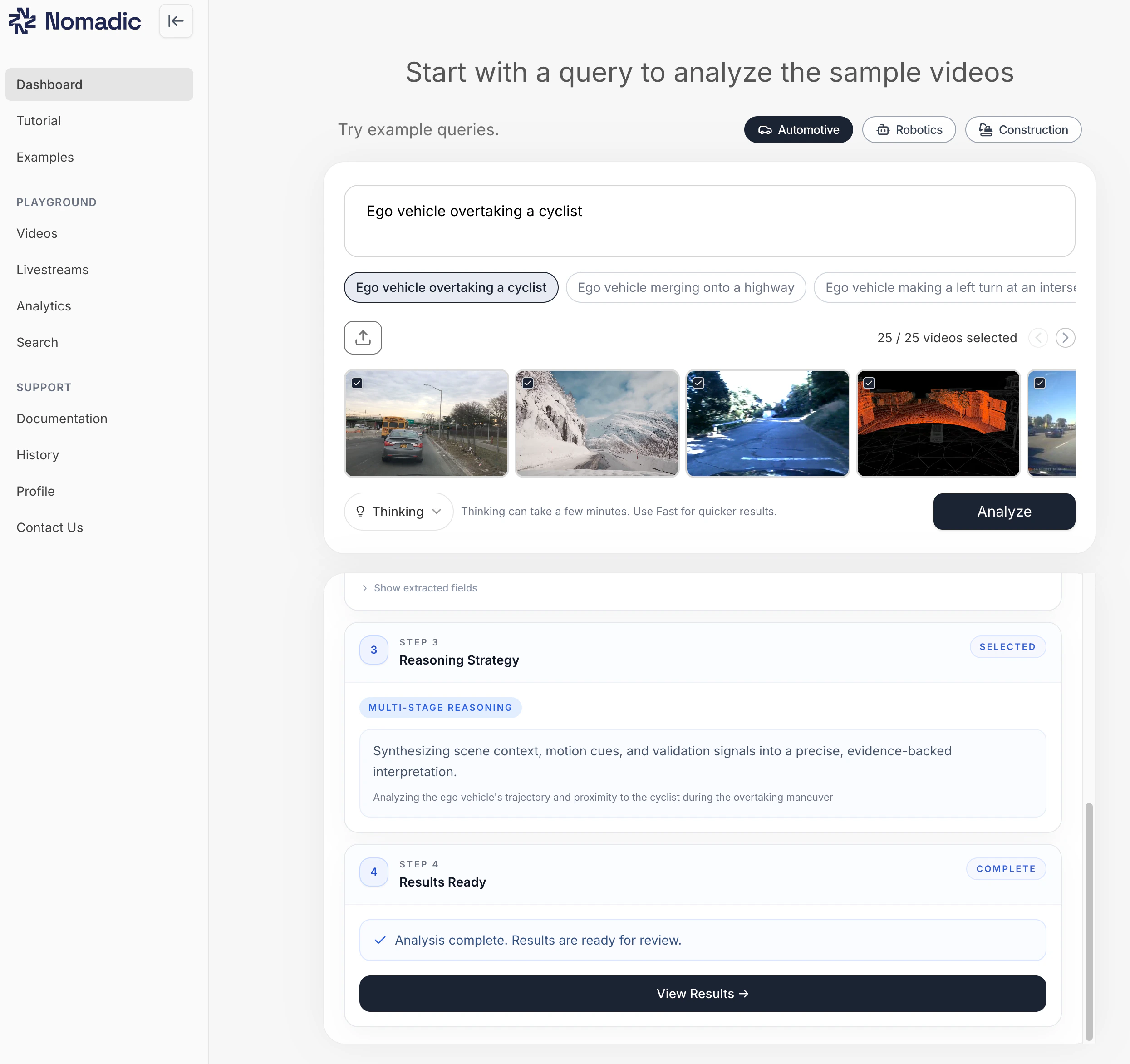
  Now lets run an analysis and view the results.
</div>

### 2. Run the Analysis

* Start by entering a query or selecting a sample query.
* Click "Analyze"
* Once analysis is complete, scroll down and click "View Results" to see full results.

<img src="https://mintcdn.com/nomadicmlinc/-FOX_0DwEjBpd1-m/screenshots/SCR-query%20analyze.png?fit=max&auto=format&n=-FOX_0DwEjBpd1-m&q=85&s=1829f10a0ac75c1ddcb2ced66648732e" alt="Nomadic login screen" style={{ width: '100%' }} width="2490" height="2344" data-path="screenshots/SCR-query analyze.png" />

<p style={{ fontSize: '1.25rem', fontWeight: 600, marginTop: '1.5rem', marginBottom: '1rem', border: '1px solid #C7CAEC', borderRadius: '8px', padding: '12px 16px', backgroundColor: '#F5F6FB' }}>
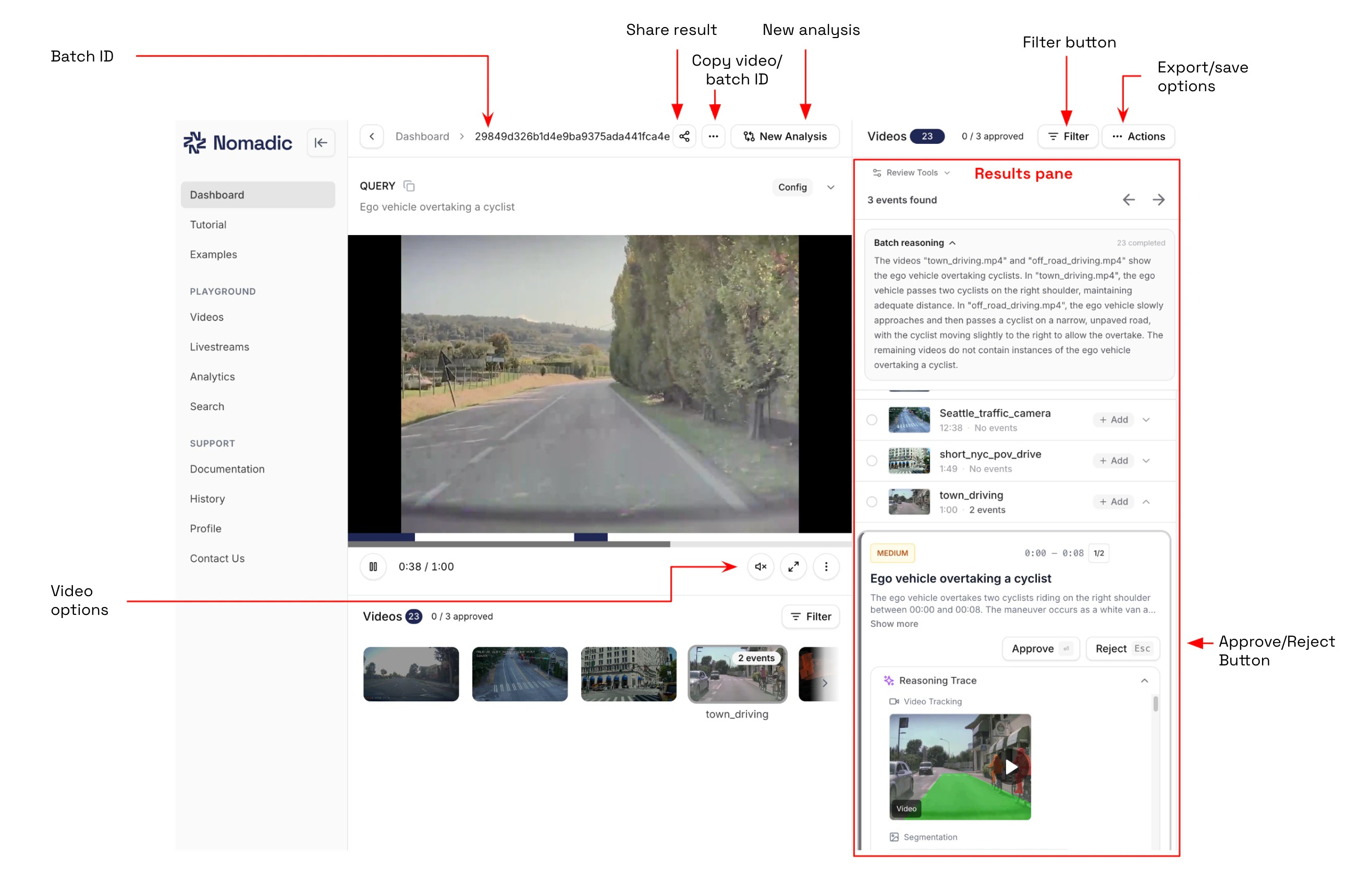
  The results page shows further details on the analysis. See the table below for the various menu options in the interface.
</p>

<img src="https://mintcdn.com/nomadicmlinc/-FOX_0DwEjBpd1-m/screenshots/SCR-query%20results.png?fit=max&auto=format&n=-FOX_0DwEjBpd1-m&q=85&s=d46d9c4bfcbca6f4eec00dbaa00185eb" alt="Nomadic login screen" style={{ width: '100%' }} width="2632" height="1708" data-path="screenshots/SCR-query results.png" />

<table style={{ borderCollapse: 'collapse', width: '80%', margin: '0 auto' }}>
  <thead>
    <tr>
      <th style={{ border: '1px solid #d1d5db', padding: '8px', textAlign: 'left', backgroundColor: '#f3f4f6' }}>Feature</th>
      <th style={{ border: '1px solid #d1d5db', padding: '8px', textAlign: 'left', backgroundColor: '#f3f4f6' }}>Description</th>
    </tr>
  </thead>

  <tbody>
    <tr>
      <td style={{ border: '1px solid #d1d5db', padding: '8px' }}><strong>Batch ID</strong></td>
      <td style={{ border: '1px solid #d1d5db', padding: '8px' }}>Unique Batch ID for this query</td>
    </tr>

    <tr>
      <td style={{ border: '1px solid #d1d5db', padding: '8px' }}><strong>Share result</strong></td>
      <td style={{ border: '1px solid #d1d5db', padding: '8px' }}>Share batch result using this link</td>
    </tr>

    <tr>
      <td style={{ border: '1px solid #d1d5db', padding: '8px' }}><strong>Copy video/batch ID</strong></td>
      <td style={{ border: '1px solid #d1d5db', padding: '8px' }}>Copy the video ID or batch ID</td>
    </tr>

    <tr>
      <td style={{ border: '1px solid #d1d5db', padding: '8px' }}><strong>New Analysis</strong></td>
      <td style={{ border: '1px solid #d1d5db', padding: '8px' }}>Run a new analysis on the same set of videos</td>
    </tr>

    <tr>
      <td style={{ border: '1px solid #d1d5db', padding: '8px' }}><strong>Filter button</strong></td>
      <td style={{ border: '1px solid #d1d5db', padding: '8px' }}>Filter by approved, rejected, pending events </td>
    </tr>

    <tr>
      <td style={{ border: '1px solid #d1d5db', padding: '8px' }}><strong>Export/save options</strong></td>
      <td style={{ border: '1px solid #d1d5db', padding: '8px' }}>Save your data in csv or json format</td>
    </tr>

    <tr>
      <td style={{ border: '1px solid #d1d5db', padding: '8px' }}><strong>Approve/Reject button</strong></td>

      <td style={{ border: '1px solid #d1d5db', padding: '8px' }}>
        Approved - Analysis is correct and results match query.

        <br />

        Rejected - Analysis incorrect
      </td>
    </tr>

    <tr>
      <td style={{ border: '1px solid #d1d5db', padding: '8px' }}><strong>Reasoning trace</strong></td>
      <td style={{ border: '1px solid #d1d5db', padding: '8px' }}>View reasoning for detected event for this analysis</td>
    </tr>

    <tr>
      <td style={{ border: '1px solid #d1d5db', padding: '8px' }}><strong>Analyze</strong></td>
      <td style={{ border: '1px solid #d1d5db', padding: '8px' }}>Click to perform analysis</td>
    </tr>
  </tbody>
</table>

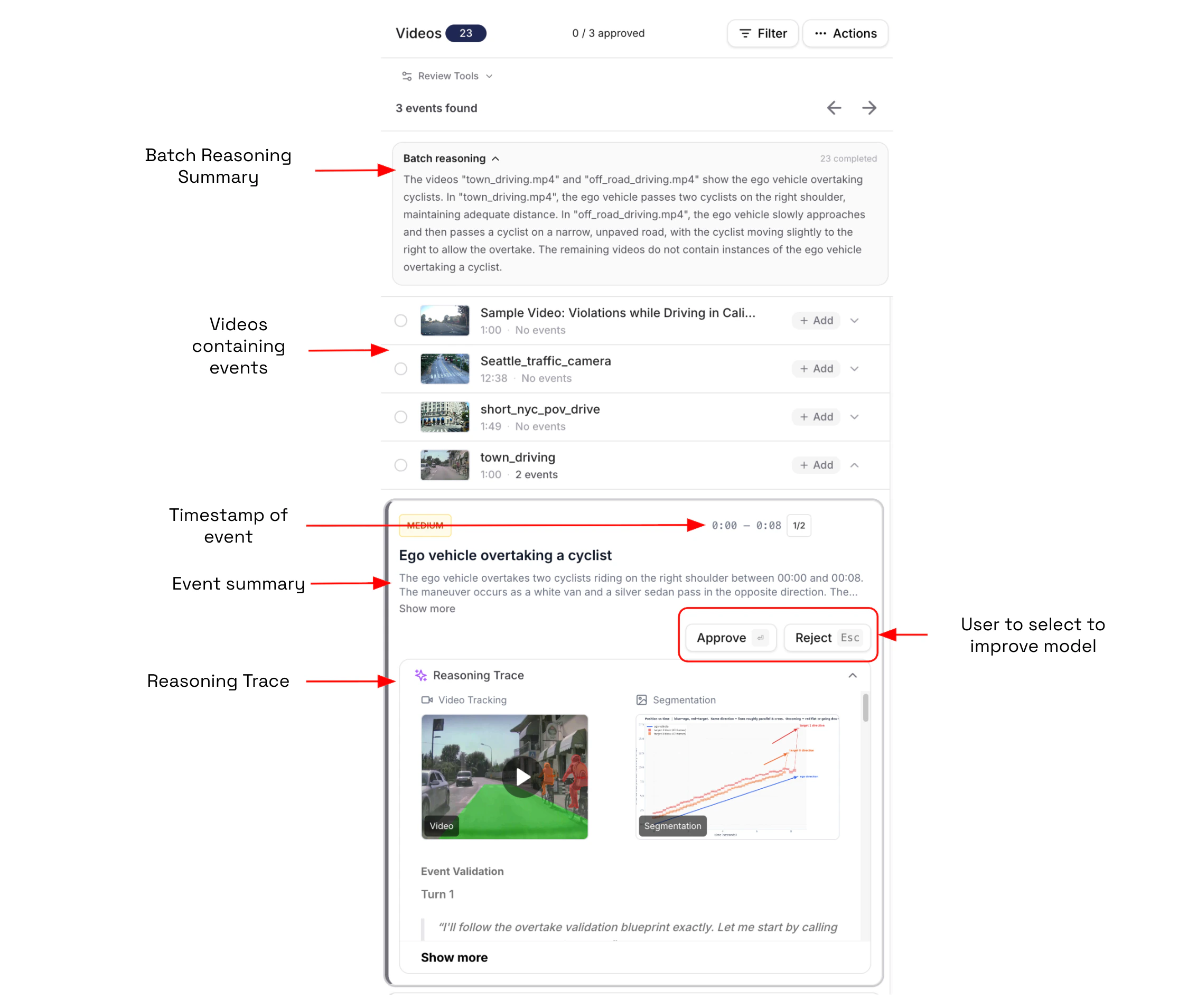
### 3. Review the analysis.

<p style={{ fontSize: '1.25rem', fontWeight: 600, marginTop: '1.5rem', marginBottom: '1rem', border: '1px solid #C7CAEC', borderRadius: '8px', padding: '12px 16px', backgroundColor: '#F5F6FB' }}>
  The results pane shows the full details on this analysis.
</p>

<img src="https://mintcdn.com/nomadicmlinc/-FOX_0DwEjBpd1-m/screenshots/SCR-analysis%20details.png?fit=max&auto=format&n=-FOX_0DwEjBpd1-m&q=85&s=c9ede538f868d08218be8d66bc5ee36f" alt="Nomadic login screen" style={{ width: '100%' }} width="2266" height="1908" data-path="screenshots/SCR-analysis details.png" />

* Batch reasoning - Summary of the batch analysis for these videos. You can click on a video with a event label and read more about the analysis.

* Event Summary describes what is happening in the scene during the displayed timestamp.

* Reasoning Trace shows how our agents process in the data to provide the results to the user's query.

### Additional Resources

<CardGroup cols={3}>
  <Card title="Explore custom analysis" icon="filter" href="https://app.nomadicml.com/events">
    Dig deeper into using Nomadic's tool with custom queries and settings.
  </Card>

  <Card title="Get Analytics" icon="chart-bar" href="https://app.nomadicml.com/live-demo/use-cases/statistics?path=sample_videos">
    Gerenate data reports from analyzed videos.
  </Card>

  <Card title="Advanced Topics" icon="arrow-right" href="/getting-started/vpc-setup">
    Find documentation on more topics.
  </Card>
</CardGroup>