

primary_action values such as pick_grasp and
place_position, and hands_used values both, left, right, and
unspecified. Your Studio’s schema is the source of truth.
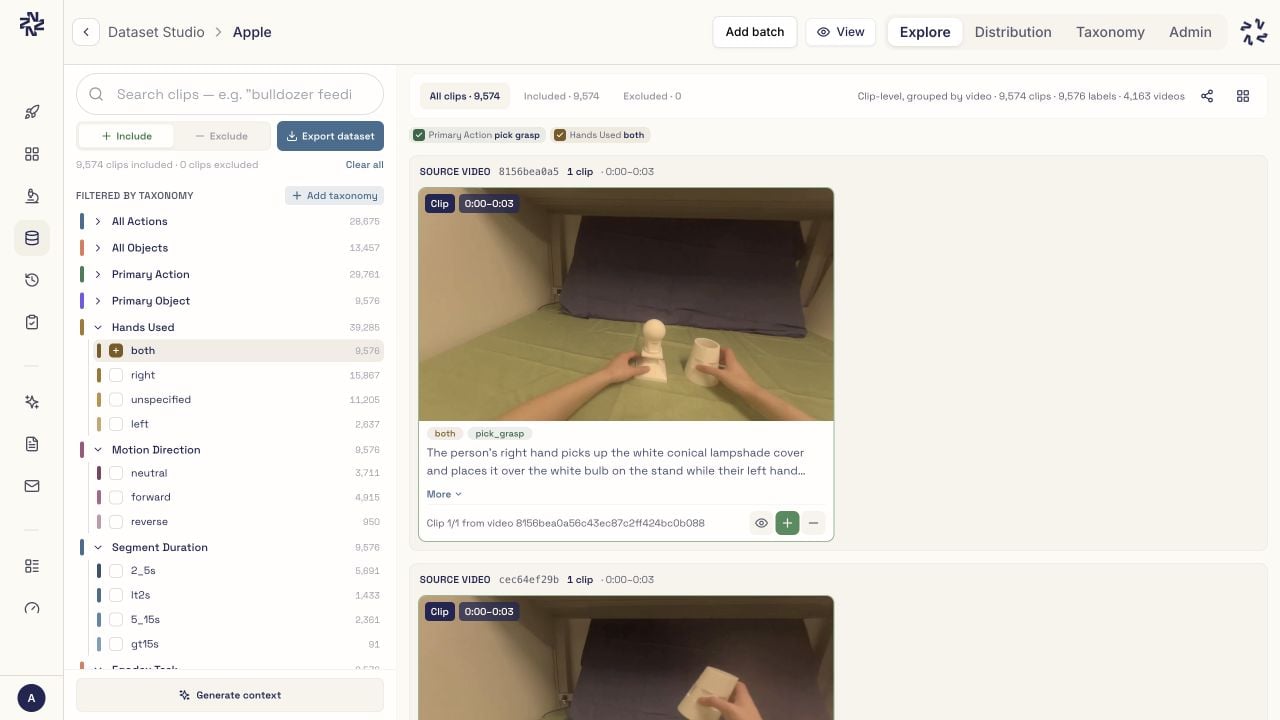
In this example, primary_action describes what happens in a clip:
pick_grasp means someone picks up an object. hands_used identifies the
hands involved. The Explore view below selects pick_grasp and both, and
shows a matching clip with those labels. Your Studio may have different fields
and values.
Filter and refine
Fields infilters are joined with AND. A list of values for one field means
OR within that field:
refined means pick_grasp AND both, matching the screenshot, without changing
results. Pass ["left", "both"] for left OR both. Exact-filter
iteration fetches subsequent pages as needed. Use results.first(20) for a
small sample, or set page_size (1–500) to control request size.
Numeric taxonomy fields support strict thresholds and equality. The field must
contain numbers, such as speed_mps, rather than category labels:
<, >, and =. Boolean fields accept Python
True and False, which can be combined with numeric or categorical filters:
where:
all_of requires every listed value:
Reading large result sets
total is the match count for the filter response. Iteration requests later
pages automatically, up to the current Studio event table. Pagination uses
offsets, not a snapshot token: if batches or taxonomy values change while you
iterate, restart the filter before treating the collected rows as a stable
export set. The SDK does not expose a resume cursor for an interrupted
iteration. Preserve event.event_id when deduplicating results across
independent runs; video_id alone can group several distinct events.
Check client.studio.facet_rows(studio_id).get("truncated") before relying on
coverage of a large Studio. A successful exact filter enumerates labeled
matches in that event table; it cannot guarantee the source analysis labeled
every physical occurrence.